Introduction
The documentation here outlines the structure of the platform and its communication flows to connect the separate systems as a single unified crowdsensing platform. Additionally, each system contains setup, usage, and deployment documentations.
Architecture
The high-level overview outlines the communications between all the systems of the platform.
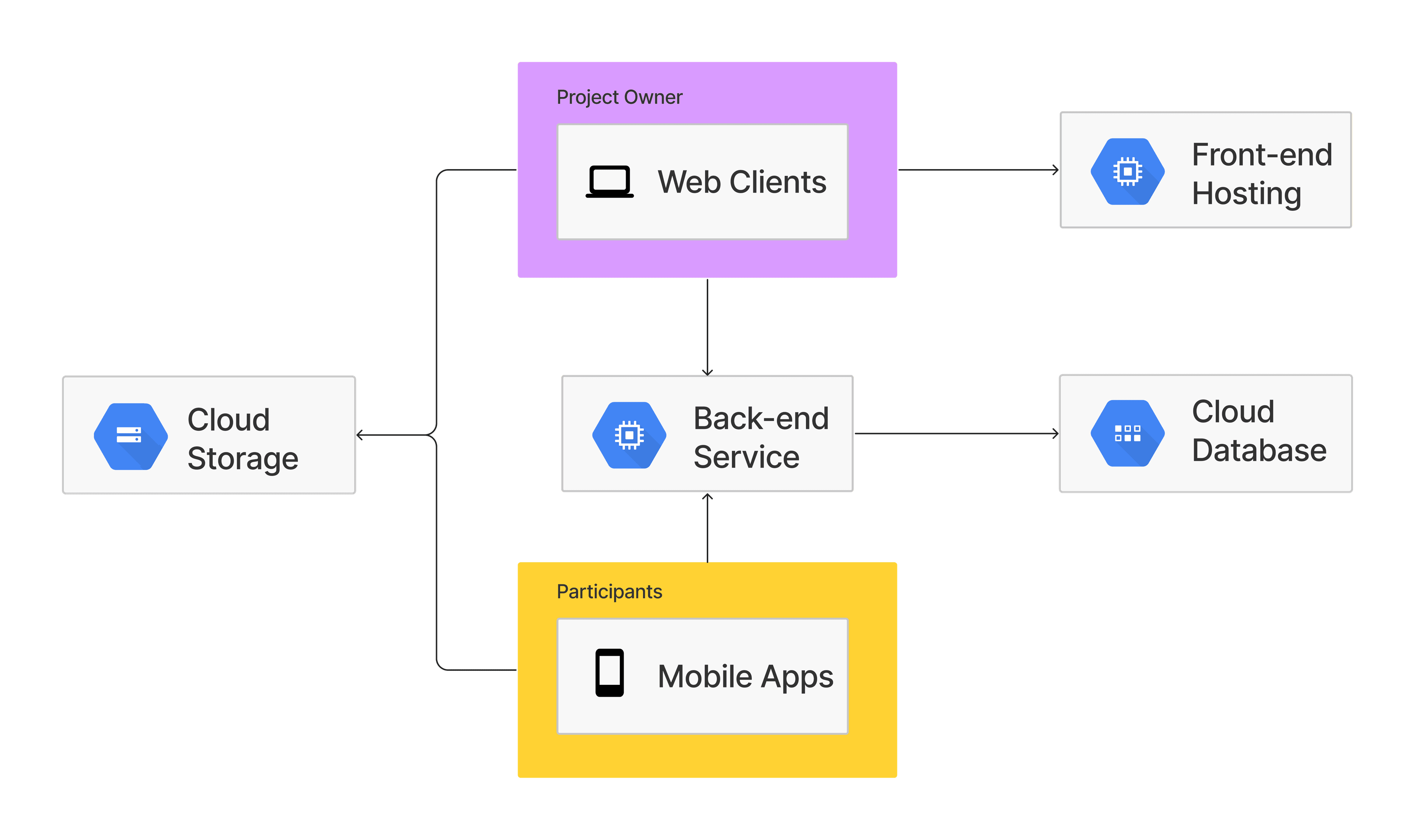
The platform is built with 3 separate systems that communicates with a shared backend service to perform database operations.
As seen in the overview above, the frontend and mobile application communicates through the same API endpoints from the server which interacts with the database through an Object Data Modeling (ODM) layer, more info under MongoDB.
A cloud storage is also used by both the frontend applications to share project data once the data collection from the participants are completed. The data collected are uploaded directly to the cloud storage and are accessible to the project owners when the project has concluded. Details for this process are described in Collecting sensor data.
User types
Below shows the two classifications of a user type on the platform. The two user types have different needs and requires different applications.
Project owner
Project owners are users who creates crowdsensing projects on the platform for participants to join. They are the primary users who adds value to the platform economy by purchasing credits to pay for hosting their projects on the platform and its participants.
Participant
Participants are users who takes on the data collection role to fulfil the project needs. They are the user group who are crowdsourced to complete the data collection needs of projects for rewards.
Platform economy
The platform also maintains its own economy to streamline the transfer of monetary value between users (project owner to participants) and the platform. This provides the added benefit of reduced the banking processing fees only at the crediting and debiting channels of the platform when users purchase or convert the platform currency back to their local legal tender.
The project owners are the primary user that generates value into the system by purchasing credits to pay for their project hosting cost and participant’s completion rewards.
Process flow
There are two main process flows on the crowsdsensing platform for each user types identified in User types.
Creating a project
The project creation follows a linear process flow as shown below.

This process is used by Project owner to create projects for their research needs. In this process, information about the project, objectives/requirements and participants needed will be collected. When the necessary information are provided, the Project owner will need to complete payments to the platform to host the project and to hold the participant's reward to be released when the project concludes.
After payments are processed, the project will then be listed on the platform for all eligible Participant to join.
Collecting sensor data
The data collection process is used by the Participant to collect sensor data for a project.
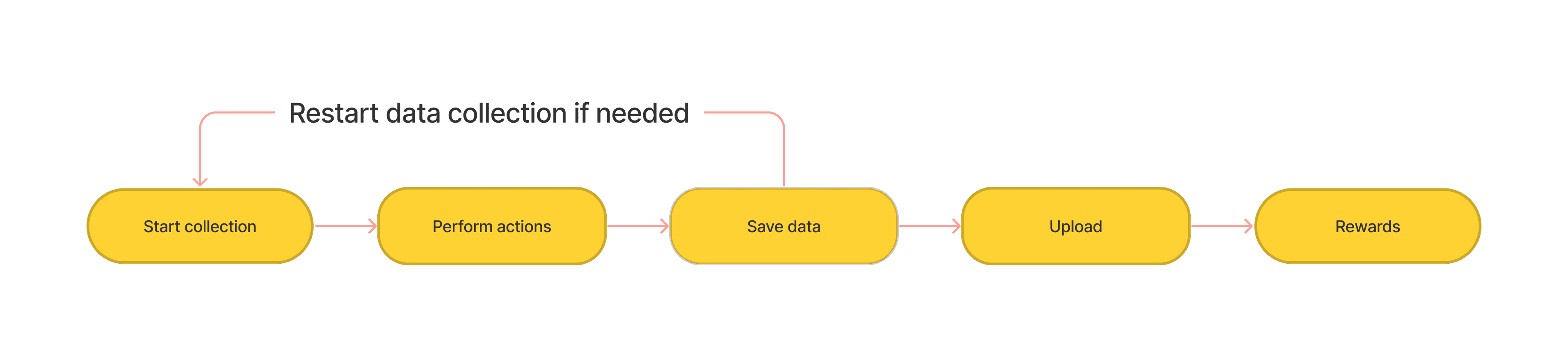
This process involves 5 stages:
- Start collection: Begins logging the sensor data.
- Perform actions: Participant to perform actions to satisfy project requirements.
- Save data: Stops logging and package the data ready to submit.
- Upload: Upload and submit the collected data to the cloud.
- Rewards: Receives the project rewards for successful data collection.
The process can restart before uploading should the participant wish to recollect the data.
Technologies
The primary techonlogy stack utilises the MERN stack + React Native to have 3 applications; frontend, backend and mobile. Additionally, cloud technologies were also leveraged into the system.
React
Requires React version 18.2.0+
React is the frontend framework used for the dashboard application used by project owners as a single page application.
React Native
Requires React Native version 0.68.2+
React Native is used for the cross-platform mobile application to support both Android and iOS mobile sensing application.
NodeJS + Express
Requires NodeJS version 18.14.0+
Requires Express version 4.18.4+
The backend server application to process request from both the frontend dashboard and mobile application and communicates with the database.
MongoDB
Requires MongoDB version 4.7.0+
Requires Mongoose version 6.4.0+
The NoSQL database used by the platform. Mongoose is used as an ODM library for MongoDB.
Firebase
Requires Firebase version 9
The cloud storage solution used to save and download project sensing results data.
Create and Register your Firebase application before using cloud storage functions. To get started with Firebase, follow the Create a Firebase project and register your app (opens in a new tab) guide.
Vercel
The hosting provider for both the frontend and backend application.
Expo
Requires Expo version 45
The build tool and mobile application distribution framework for React Native.